A Practical Guide to Monetizing TikTok Shop Outside the App
Monetize TikTok Shop off-app with CJ. Use approved tracking links, honor the 14-day window, and optimize placements across web, apps, and social.
December 29, 2025 12:30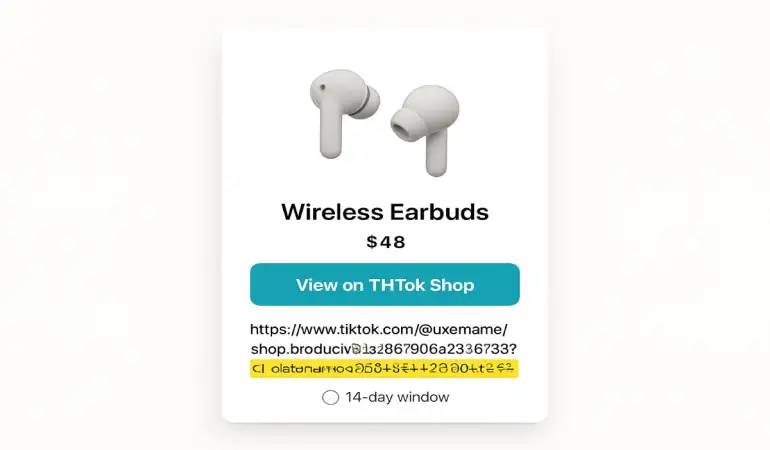
Overview of the TikTok Shop US Affiliate Program
The TikTok Shop US Affiliate Program opens a new path for publishers to bring TikTok Shop products to audiences beyond the TikTok app. Through a partnership with CJ, publishers can source approved tracking links and merchandise a wide range of items on websites, blogs, apps, and other social channels.
This is straightforward and practical. No in-app content required. No TikTok handle needed.
Tens of thousands of products are available across categories. With a 14‑day referral window, clicks that convert within that period can be credited back to your account, provided the link integrity remains intact.
It works quietly in the background. You focus on curation, content, and placements, while CJ handles tracking and reporting.
What Publishers Can Promote Outside the App
Publishers may highlight TikTok Shop products anywhere their audience already engages: on editorial pages, deal roundups, product galleries, newsletters, mobile apps, and social accounts. The program supports out‑of‑app placements, creating a bridge between discovery on your properties and checkout on TikTok Shop.
Think homepage carousels, category hubs, or in‑article modules. Think app feeds and push‑driven moments that surface a product card at the right time. Even a short social caption can carry a compliant link sourced from CJ.
Short, clear placements work well.
Who This Program Is Designed For
This program suits content publishers, commerce editors, niche bloggers, deal sites, comparison apps, and social creators who want to drive shoppers directly to TikTok Shop without relying on in‑app posting. If your audience trusts your picks and clicks through to buy, the model fits.
You can be small and focused or large and multi‑channel. The common thread is intentional product selection and clean implementation of tracking links.
Core Features and How They Work
Product breadth and discovery
Access spans tens of thousands of TikTok Shop products. This breadth supports editorial variety—daily deals, evergreen recommendations, category deep lists, and timely seasonal edits. It also allows testing different price points and brands to find strong performers for your audience.
Discovery can be editorially led. Start with a theme, then pull fitting items from the feed. Or begin with a seller or brand you know your readers love and build outward.
The 14 day referral window explained
The referral window is 14 days from the initial click. If a user clicks your CJ tracking link and completes a qualifying purchase within that period, attribution can apply to you.
Two practical notes:
Keep the first click high in the journey so the window opens early.
If you frequently resurface products, refresh placements to welcome returning shoppers while staying within the window.
It’s a simple rule with big implications for content cadence and re‑promotion.
Link access through the CJ interface and CJ API
Links must be pulled from the CJ interface or CJ API. This means every trackable product URL originates from CJ’s Product Feed, carrying the parameters required for credit. If you operate at scale, the API helps automate fetching and syncing. If you publish manually, the interface is sufficient for day‑to‑day pulls.
Consistency matters. Use the exact links provided, and store them carefully within your CMS or app.
No TikTok account requirement
You can run the program without a TikTok account. All access flows through CJ, so the entire process—from discovery to linking to reporting—lives inside your existing affiliate operations.
No TikTok login required.
Tracking Links and Compliance Requirements
Pulling links from the Product Feed in CJ
The Product Feed is your source of truth. Find the product, copy the corresponding tracking link or programmatic identifier, and place it inside your modules. If you maintain a product database, include fields for the full tracking URL, product title, price, image URL, and availability flags where possible.
Double‑check after pasting. A stray character can break tracking.
Operating without deeplinking or promotional links
This program is not deeplink enabled and does not include promotional links at this time. That constraint keeps implementation clear: use only the links supplied in CJ’s Product Feed. Avoid manual edits designed to jump to subpages or variants. If variant selection matters, guide users in copy or imagery, not by modifying the link structure.
Less tinkering means fewer errors.
Maintaining link integrity across channels
Trackers can fail when passed through tools that rewrite or shorten URLs. If you use a shortener, ensure it preserves all parameters. Within apps, test how your in‑app browser handles redirects. On social platforms, confirm that tracking persists after click. Where possible, whitelist the link format in any link wrappers or analytics gateways you operate.
Safeguard the full URL. Your reporting depends on it.
Getting Started with CJ
Joining the program and accessing the Product Feed
Apply to the TikTok Shop US Affiliate Program within CJ. Once approved, you’ll see the Product Feed available for browsing or API access. Set up user permissions so editors, engineers, and analysts have the right level of access to pull links and review reports.
Create a simple internal checklist:
Approved program status
Feed access confirmed
Test link clicked and recorded in CJ
Reporting visibility verified
Selecting products that fit your audience
Begin with known audience interests and past converters. If your readers lean into beauty, start with skincare and tools. If your niche is home, build a set around storage, decor, and kitchen helpers. Pull a balanced mix of price points and anchor items with reliable demand.
Use editorial judgment. One or two strong hero products can carry a page, while secondary items round it out.
Implementing links on websites blogs apps and social channels
On the web, integrate links into:
Product cards with price, image, and a short benefit line
In‑text mentions inside reviews
Sticky bars or blocks inside long articles
Category hubs and collection pages
In apps, consider:
Feed modules keyed to user interest tags
Product detail callouts inside relevant content
Interstitials at natural rest points
On social:
Captioned posts with a clear URL path
Link in bio hubs that preserve tracking
Story frames with a visible call to action
Always place the link close to the product image or claim. Friction is the silent killer.
Practical Use Cases and Placement Ideas
On site merchandising and curated collections
Build seasonal or theme‑based collections: “Fall home refresh,” “Weekday beauty routine,” or “Desk upgrades under $50.” Collections give structure, keep pages fresh, and invite repeat visits as you rotate products in and out.
Short, themed modules fit neatly on homepages and category rails.
Editorial reviews guides and seasonal lists
A detailed review paired with a clear link reduces hesitation. Gift guides, back‑to‑school lists, and holiday rundowns benefit from a mix of high‑intent picks and impulse‑friendly add‑ons. Numbered lists, comparison blocks, and pros/cons callouts help readers decide fast.
Aim for clarity, not hype. Concrete details sell.
App integrations and in app commerce moments
Trigger product cards when users interact with relevant content. A recipe screen can surface kitchen tools. A fitness log can present recovery aids. Keep the card compact, with one image, a short descriptor, and a button that holds the full CJ link.
One tap, one outcome.
Syndicating to other social platforms
Bring the same products to platforms where your audience spends time. Repurpose your top items into short posts or stories, linking through approved paths that keep parameters intact. Maintain consistent naming and thumbnails to build recognition across channels.
Repetition builds familiarity.
Content and User Experience Best Practices
Clear disclosures and transparent calls to action
Disclose affiliate relationships plainly near the first link on a page and in social captions where space allows. Simple language works best. For calls to action, use direct phrasing: “Shop now,” “View on TikTok Shop,” or “Check price.”
Honesty builds trust.
Visual treatments for product cards and galleries
Use clean product imagery—front‑facing and well lit. Keep titles readable on mobile, and avoid dense copy blocks inside cards. Price badges and small accent labels like “Editor pick” guide the eye without clutter.
White space is your ally.
Managing out of stock items and updating links
Monitor availability. If an item sells out, swap in a comparable product rather than leaving dead ends. Keep a watchlist of top performers and review them weekly. For larger operations, schedule a script to check availability fields from the feed and flag items for removal.
A living catalog performs better than a static one.
Working Within Program Limitations
Planning around the 14 day attribution window
Time your content so clicks happen when buyers are most ready. During gifting periods, publish earlier to give shoppers room to decide while staying inside the window. Re‑feature hero items mid‑cycle to catch second looks.
Pacing matters.
Operating without deeplinks
Without deeplinks, rely on context to guide users: multiple images to show variants, brief copy to indicate color or size, and comparison blocks that highlight differences. Keep expectations clear so the product page feels like a continuation of your pitch.
Small instructions reduce bounce.
Setting expectations for user flow and conversions
Users click from your property to TikTok Shop. That handoff is expected. Prepare them with a short line: “You’ll complete checkout on TikTok Shop.” Fewer surprises mean steadier conversion rates and fewer support questions.
Clarity pays off.
Measuring Performance and Optimizing
Reading CJ reporting and identifying top performers
Use CJ’s reporting to review clicks, conversions, and earnings at the product level. Sort by EPC and conversion rate to spot winners. Track by placement, too, so you can prune low‑yield modules and expand high‑yield spots.
Numbers reveal patterns.
Testing product mixes content formats and placements
Rotate product sets weekly. Alternate between single‑product features and compact grids. Try different price anchors: one premium item surrounded by budget picks, then invert the ratio. Keep the headline stable while changing the product lineup to isolate variables.
Small tests compound over time.
Iterating based on clickthrough and conversion signals
High clicks but low conversions? Tighten copy, clarify what buyers receive, and verify the link. Low clicks but solid conversions? Raise placement prominence or add stronger thumbnails. When a product fades, retire it gracefully and promote a fresh challenger.
Iterate, measure, repeat.
Common Questions and Quick Answers
Do you need a TikTok account
No. All links and access flow through CJ. You can run the program without creating or maintaining a TikTok account.
Where to get tracking links
Pull links from the Product Feed in the CJ interface or CJ API. Use them as is, without manual alterations.
Which channels are permitted
Websites, blogs, apps, and other social platforms are supported. Make sure your placements comply with CJ policies and preserve link parameters.
Custom landing pages and user flow considerations
You can design your own landing pages or collections on your properties, then link out using the CJ‑provided URLs. Prepare visitors for the handoff with a brief note that checkout occurs on TikTok Shop, and keep calls to action clear and consistent.
No surprises, smooth flow.
No TikTok account needed — access all links via CJ.